← All projects03 / HearMateNext project ↗

Research, design & making · 6 pages · Select “View at 100%” to read the finer details.

03

HearMate

Wearable · Service · AI
Bone-conduction companion system

For people with hearing loss, the hard part of a conversation is rarely a single word — it is missing information, having to ask again, and the quiet pressure of slowing everyone down. HearMate pairs an open-ear bone-conduction headset with an AI watch that captions speech in real time, saves what matters on request, and lets the wearer tune their sound simply by saying how it feels. A companion app keeps the record; a doctor portal turns daily feedback into data an audiologist can act on.
The system  ·  four touchpoints, one conversation
Bone-conduction headsetSound reaches the inner ear through the cheekbone; ears stay open
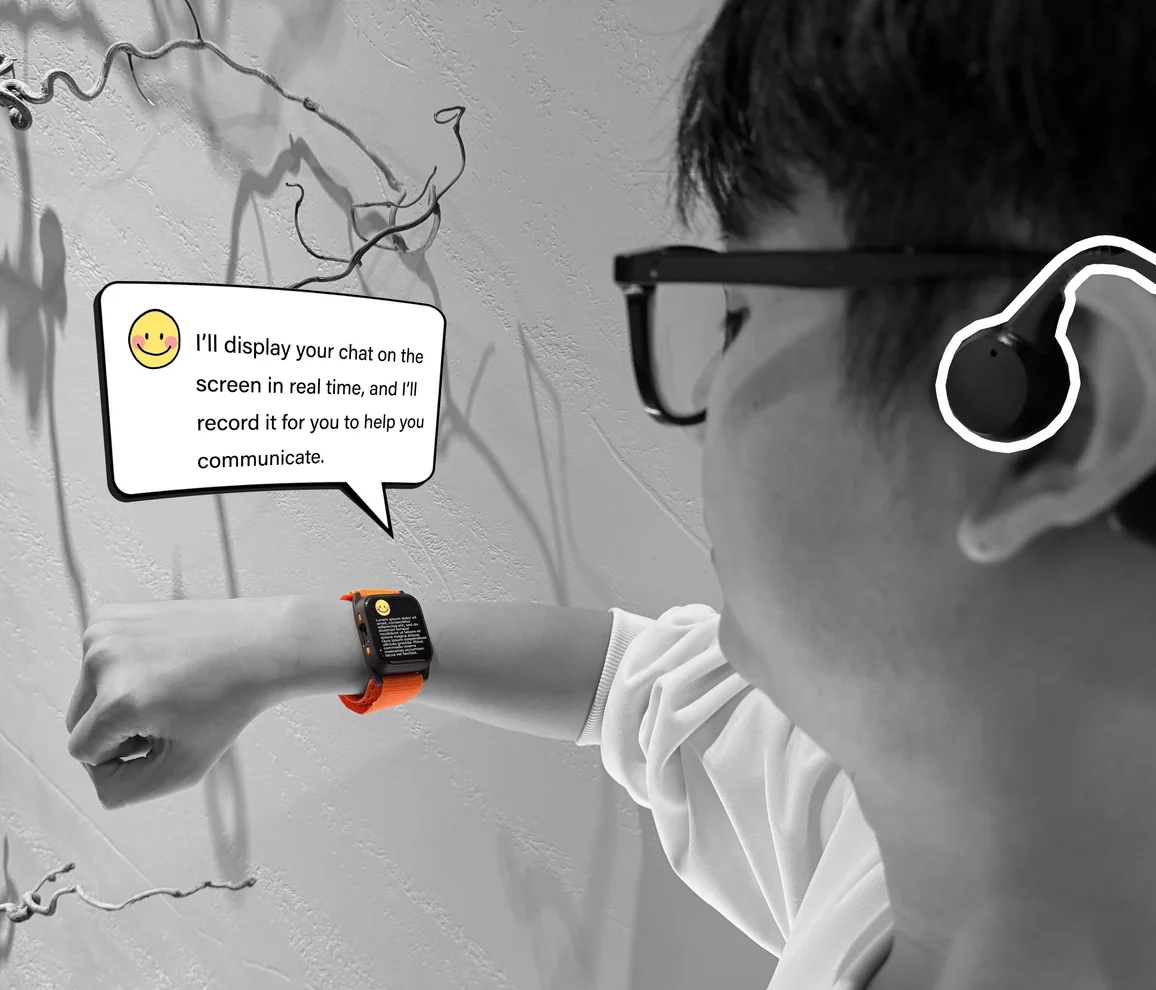
AI watchLive captions, voice tuning, one-tap save and a companion called Mate
HearMate appNotes, to-dos and summaries — always linked to the original record
Doctor portalAudiogram, safe ranges, comfort trends and follow-up in one view
Key visual — staged with the working prototype
01Research & insight

Missed words, repeated questions, quiet pressure

Hearing loss is usually framed as a volume problem. In everyday conversation it shows up as three frictions — missing information, asking again, and the pressure of holding others up. Each one became a design requirement.

1.1The scale
430M
people need rehabilitation for disabling hearing loss today
700M+
expected by 2050 — about one in every ten people
83%
of people who could benefit from a hearing aid do not use one
1 in 4
adults over 60 live with disabling hearing loss
Sources: WHO, Deafness and hearing loss fact sheet (2026); WHO, World Report on Hearing (2021)
1.2How bone conduction works
BC transducer · on the cheekbone skull vibration skull bone ear canal eardrum ossicles cochlea auditory nerve sound OUTER EARMIDDLEINNER EAR
Air: canal → eardrum → ossicles → cochlea
Bone: skull vibration → cochlea, ears stay open
…and who it can help suitability by type of loss
Conductiveouter / middle ear

Sound is blocked before the cochlea while the inner ear still works. Bone conduction goes around the blockage — the clearest fit.

Mixedboth

Helps with the conductive part; the benefit depends on how much the inner ear can still do.

Sensorineuralinner ear / nerve

Still relies on the cochlea and auditory nerve, so gain is limited. Here captions carry more of the load.

Design rule. An audiologist confirms suitability before fitting. HearMate is a communication and companion aid — a consumer bone-conduction headset is not a medical hearing aid.

1.3
Personas
Three people, three kinds of hearing — each audiogram shows why one device has to serve very different ears.
PrimaryOlder adult
Zhou Jianguo , 67
Retired engineer · lives alone · age-related loss, both ears
04080 2505001k2k4k8k
○ right  × left  · dB HL / Hz — illustrative
“I nod along so I don’t slow everyone down.”
Sensorineural, sloping: high pitches fade first, so consonants like s, f, th blur and voices sound “mumbled” rather than quiet.
Needs
  • Follow family talk without asking people to repeat
  • Catch prices, names and appointment times
  • Nothing that looks like a “hearing aid”
Pain points
  • Noisy places blur every voice
  • Forgets details given at the clinic
  • Can’t explain which sounds are hard
SecondaryTeenager
Lin Xiaoyu , 16
High-school student · conductive loss, right ear
04080 2505001k2k4k8k air–bone gap ≈ 30 dB
○ right, air  < right, bone · left ear normal
“By the time I ask again, the group has already moved on.”
The inner ear works; sound is lost on the way in. The gap between air and bone thresholds is exactly what bone conduction can recover.
Needs
  • Keep up in fast group discussions
  • Capture homework and deadlines
  • Ears open in class and on the street
Pain points
  • Asking twice in front of classmates
  • Canteen and corridor noise
  • In-ear devices feel blocked and itchy
StakeholderClinician
Dr. Wang Min , 41
Audiologist · hearing clinic · follow-up every 4–8 weeks
TODAYWITH HEARMATE ? visitvisit6 weeks of guesswork wear · comfort · tuning, daily
Follow-up rhythm, illustrative
“Between visits I’m guessing. ‘It’s fine’ tells me nothing.”
Decides the fitting — the AI may summarise trends, but the clinical judgement stays with the doctor.
Needs
  • Objective data between visits
  • Know which situations are hard
  • Set safe limits, not exact values
Pain points
  • Patients forget or soften feedback
  • Settings drift with no record
  • No channel for small questions
1.4
A Saturday with Zhou — journey map
Same six moments, felt today and with HearMate. Every dip maps to a feature.
TodayWith HearMate
MomentSceneFeelingPain pointOpportunity at easestrained
08:30
Wet market
Vendors call out prices over the noise.
Mishears a price, too embarrassed to ask twice.
Noise modeNumbers on screen
10:00
Clinic visit
The GP explains new tablets and the next date.
Only half of it is remembered at home.
Key-info checkSave → to-do
12:30
Family lunch
Six people, three conversations at once.
Nods along, then drifts out of the talk.
Live captionsPrevious line
15:00
Video call
Grandson calls; the phone audio sounds thin.
Keeps saying “what?” — the call ends early.
“Muddy voices”Clarity +2 dB
20:00
Evening alone
A quiet flat after a day of straining to hear.
Feels isolated, hesitant to call anyone.
Mate check-inWind-down
Monthly
Follow-up
Ten minutes with the audiologist.
Can’t say what was hard, or when.
Portal trendsTuning history
lowest point — drops out of the conversation
02Concept & system

One conversation, four touchpoints

HearMate is designed as a service, not a gadget. The headset and watch handle the moment, the app keeps the record, and the doctor portal closes the loop between visits — with the wearer deciding what leaves the wrist.

2.1
System map
who talks to whom, and what travels
ON THE BODYPHONE + CLOUDCLINIC speech2 mics vibration captions↕ voice, touch BLE 5notes · commands speech→textintent · summary tuned audioA2DP* usage · comforttuning history transcripts onlywith consent safe ranges reviews· decides OTHERStalking nearby BCHEADSET WEARER AI WATCH+ Mate, the companion CLOUDAI HEARMATEAPP DOCTORPORTAL AUDIOLOGIST * ESP32-S3 offers Bluetooth LE only, so the prototype streams headset audio through the phone; a direct LE Audio link is the target.
data / controlsound pathshared with clinic
2.2
Service blueprint
from the first hearing test to the next follow-up
Stage
01Assessat the clinic
02Fitset safe ranges
03Converseevery day
04Adjusttune by voice
05Keepsave & review
06Follow upevery 4–8 weeks
Touchpoint
audiogram
portal
watch · headset
watch
watch · app
portal · clinic
Weareractions
Hearing test and a suitability check for bone conduction
Pairs watch and headset; picks a starting preset
Talks as usual, glances at captions, swipes for the last line
Says “voices are muddy”, answers “clearer?” and “comfortable?”
“Note this down” — reads the summary later in the app
Sends two questions, visits, agrees new settings
Line of interaction
Frontstagewatch, headset
Not worn yet
Big-type onboarding; test tones through the headset
Live captions; unsure words flagged; names and times to confirm
One bounded step (±2 dB), two quick checks, one-tap mute
“Saved” card and a visible recording dot
Visit reminder: “share these questions?”
Frontstageapp, portal
Portal: doctor enters the audiogram and notes
Portal: gain range per band and an output ceiling
App: today’s wear time, talks and hard moments
App: a before / after log of every change
App: summary ↔ source; edit, delete, share
Portal: trends, hard scenes, comfort; ranges updated
Line of visibility
BackstageAI, cloud
Stores the baseline profile, encrypted
Calibrates device output against the ceiling
Speech-to-text with confidence; multi-talker warning
Classifies: volume · clarity · discomfort · noise
Summarises, extracts to-dos, keeps the link to the original
Aggregates trends; drafts notes for the doctor
Line of internal interaction
Supportpeople, rules
Audiologist assessment first
Limits are set by the doctor
Connection state always shown
Ceiling · small steps · restore
Saving and sharing are opt-in
The doctor makes the call
2.3
Build order
what the prototype has to prove first, before anything else is added
1
Live captionsaccuracy and delay on 1.83″
2
Save on requestvoice or button, linked to source
3
Bounded tuningplus a feedback log
4
Doctor setupranges via the portal
5
Matecompanion and reminders
2.4
Design principles
six rules every screen and flow was checked against
01Say it, don’t set it

People describe how sound feels, not which band to boost. Mate maps “muddy” to clarity and “harsh” to comfort — then asks.

→ voice tuning
02See it twice

Captions back up the ear instead of replacing it: only the current line is large, and the last line is one swipe away.

→ live captions
03Never hear-only

Every prompt is also shown, and every action works by voice, touch or button — no step depends on hearing a beep.

→ multimodal input
04Keep on purpose

Nothing is stored unless the wearer asks. Summaries stay linked to the original words, so they can always be checked.

→ save & review
05Safe by default

Output ceiling, small steps, one-tap mute. After a dropout, volume never returns above the last confirmed level.

→ safety rails
06Doctor in the loop

AI drafts the trends; the audiologist decides. Chats and full transcripts reach the clinic only if the wearer shares them.

→ doctor portal
2.5
Positioning
UNSERVED SOUND SUPPORT → tuned to the ear CONVERSATION SUPPORT → HEARING AIDStuned sound · stigma, cost PHONE CAPTION APPSa phone held between people CONSUMER BC HEADSETSopen-ear, but no tuning SMARTWATCHESalerts, not conversation HEARMATEbounded tuning + captions+ a record the doctor can use
03Watch interaction

Designing for 1.83 inches

The watch is where the conversation happens. Everything on it must read at a glance, at arm’s length, mid-sentence — and nothing may depend on hearing a prompt. One idea per screen, two choices at most, and every change can be undone.

3.1
Anatomy of a caption
LIVE · 2 voices15:42
one after breakfast, back on Thu 3:30
↓ last line  ·  hold to save
1
2
3
4
5
6
◂ talk
◂ mute
1Status

Live state, how many voices, time and battery — 11 px, quiet grey.

2Previous line

16 / 21 px at 42 % white: context that never competes.

3Current line

Nunito ExtraBold 25 / 30 px, pure white, four lines at most.

4Unsure word

Dotted orange underline when confidence is low — never silently guessed.

5Key information

Names, numbers, times and places are boxed; one tap confirms and saves.

6Hint bar

Gestures spelled out on screen — no hidden moves.

1.83″touch LCD
240 × 284pixels
19.7 : 1white on #0B0B0B
≤ 4 linesper caption
3.2
Key flows
12 key screens, drawn at the display’s native 240 × 284 px
ACaption, check, keep

Swipe down for the line just missed. Names, numbers and times ask for one tap before they are trusted. When too many people talk at once, the watch says so instead of guessing.

↑ 1 LINE BACK−0:08
…so the new pills are once a day,
↑ back to live
A1Swipe ↓ — the line just missed
LIVE15:42
Did they say
Thursday
3:30 pm?
Yes, save
Ask again
A2Key info asks before it is saved
LIVE · 4+ voices12:41
Many voices at once — captions may miss words.
I think Lei said the 9th…
A3Honest about its limits
REC 0:4210:07
Saved to HearMate
“Take one after breakfast · back Thu 3:30”
To-do+ audio
tap to undo
A4“Note this down” → a to-do
BSay it to tune it

The wearer describes the problem in their own words. Mate picks one of four intents, moves one 2 dB step inside the doctor’s range, then asks two questions before anything is kept.

MATE15:06
I’m listening…
“Voices sound a bit muddy.”
B1Plain words, any time
MATE15:06
Sounds like clarity.
VolumeClarityComfortNoise
2505001k2k4k8k
B2One of four intents, one step
MATE · 1 OF 215:06
Is that
clearer?
say it or tap
Yes
No
B3Check 1 — clearer?
MATE · 2 OF 215:07
Clearer and
comfortable.
Kept as your setting,
logged for Dr. Wang
↺ restore previous
B4Check 2 passed → kept
CCare & safe states

The face stays calm. Mate checks in at quiet moments, and when something fails the screen explains it — sound never returns louder than the last confirmed level.

82%
08:30
Sat 24 Oct
2 notes saved today
C1Watch face
MATE20:12
You talked with 5 people today. Two minutes to unwind?
Sure
Later
C2Mate checks in, gently
HEADSET LOST16:20
Headset
disconnected
Captions keep running. Sound comes back at your last confirmed level.
reconnecting…
C3A dropout, explained
MUTED16:21
Sound off
Captions stay on.
Press the lower button
to unmute.
C4One press to mute
3.3
Tuning logic
plain words in, one safe step out
“Voices sound muddy.” SPEECH → INTENT on the phone / in the cloud VOLUME“too quiet” → all bands +2 dB CLARITY“muddy” → 2–4 kHz +2 dB COMFORT“harsh” → 4–8 kHz −2 dB NOISE“too noisy” → noise mode on inside the doctor’s range? Hold — flag it for the doctor APPLY ONE 2 dB STEP clearer? comfortable? Revert to the last confirmed setting — the try is still logged KEEP · LOG BEFORE / AFTER yesyesyesnonono SAFETY RAILS ± 2 dB per step, never more ceiling and floor from the doctor one-press mute, any time “restore” always one tap away no auto-raise after a dropout every try logged for follow-up
3.4
Bounded adjustment
2–4 kHz band, one afternoon
ceiling · set by Dr. Wangfloor 0481216 GAIN dB BT lostmuted fitted +6 “too sharp”reverted back at +10,not higher limit → ask the doctor FITR1R2R3R4R5 kept after both checks failed a checkR = a spoken request
3.5
Input map
three ways in, none needs hearing
ActionSayTouchButton
Last line“What was that?”swipe ↓—
Save“Note this down.”hold 1 s—
Confirm info“Yes.”tap the box—
Tune“Too quiet.” “Muddy.”—upper + speak
Talk to Mate“Mate, …”tap Mateupper
Mute“Mute.”—lower

Feedback is visual first; a short tone through the headset only confirms. Both side buttons are the board’s programmable PWR / BOOT keys under printed orange caps.

04App & doctor portal

From everyday moments to a clinical record

The app is the wearer’s own record — notes, summaries and sound history, each traceable to its source. The portal shows the clinician only what care needs; anything personal sits behind a switch the wearer controls.

4.1
Companion app
large type, one task per screen, nothing saved behind the wearer’s back

The watch is for the moment; the phone is for later. Every summary keeps a link to the words it came from, every sound change is logged with its before and after, and sharing is decided per data type.

Information architecture
Today — wear, talks, hard moments, next visit
Notes — to-dos · summaries · memos
↳ detail: summary ↔ source, edit, delete
Sound — ranges, history, restore
Care — visits, questions, sharing
Me — Mate, devices, text size
20:14
Saturday, 24 October

Good evening,
Zhou

6h 20
worn
9
talks
3
saved
Hardest moment
Wet market · 08:42
Noise mode helped after 2 requests
Sound
Clarity +2 dB kept
15:07 · clearer ✓ · comfortable ✓
Next visit
Dr. Wang · Mon 2 Nov, 10:00
2 questions ready to send →
Today
Notes
Sound
Care
Me
01TodayOne glance at the whole day
20:15

Notes

Search notes
All 9To-dos 2Summaries 3
Take one tablet after breakfast
To-do · clinic 10:07
▶ 0:42
Back to clinic Thu 3:30
To-do · confirmed on watch
▶ 0:42
Video call with Hao
Summary · 15:00 · 4 points
▶ 6:12
Lei’s birthday on the 9th?
Memo · lunch 12:41 · 1 unsure word
▶ 0:18
Pork ¥28 a jin, ribs ¥32
Memo · market 08:44
▶ 0:09
Today
Notes
Sound
Care
Me
02NotesOnly what the wearer chose to keep
20:15
‹ Notes

Clinic visit

Sat 24 Oct · 10:07 · Dr. Liu, GP
AI summarycheck it against the source
• Take one tablet after breakfast 1
• Next visit Thu 29 Oct, 3:30 2
• Call the clinic if dizzy 3
Source · 0:42
0:12  …the new pills are once a day,
0:15  one after breakfast, 1
0:19  back on Thu 3:30. 2
0:31  If you feel dizzy, call us. 3
EditDeleteShare
03Summary ↔ sourceEvery line traceable to the words
20:16

My sound

Ranges set with Dr. Wang · 12 Oct
+2+2 2505001k2k4k8k
History
Clarity +2 dB
15:07 · clearer ✓ comfortable ✓
kept
Clarity +2 dB
14:50 · “too sharp”
reverted
Noise mode
08:42 · market
kept
↺ Restore last confirmed
Today
Notes
Sound
Care
Me
04My soundEvery change with its before and after
20:17

What Dr. Wang
can see

You decide what leaves your phone.
Shared for your care
Hearing test & ranges
Wear time & comfort
Sound changes
Questions you send
Only if you choose
Conversation summaries
Full transcripts
Chats with Mate
Any note or recording can be deleted at any time.
Today
Notes
Sound
Care
Me
05SharingConsent per type of data
4.2
Doctor portal
one patient, one screen — what changed since the last visit, and where it is hard
clinic.hearmate.app / patients / zhou-jianguo
HearMate Clinic
Patients
Follow-ups 3
Messages 2
Fitting ranges
Reports
Settings
Dr. Wang MinAudiologist

Zhou Jianguo

67 · bilateral sensorineural, sloping · fitted 12 Oct
Summaries, transcripts, Mate chats: not shared
Watch + headset Follow-up · Mon 2 Nov, 10:00 Adjust ranges

Audiogram 12 Oct · both ears

040802505001k2k4k8k
○ right   × left   · dB HL

Fitting ranges gain dB · ceiling locked

250 Hz+2—
500 Hz+4—
1 kHz+6—
2 kHz+10▲ 4
4 kHz+10▲ 4
8 kHz+8▲ 2
Orange = changed by the wearer, inside the range.

Wear & comfort last 30 days

6.1 h
worn per day
4.2 / 5
comfort, up from 3.4

Where it is hard requests + swipes

Market38%
Family meals27%
Phone & video18%
TV9%
Other8%
Saturday mornings account for 61% of market requests.

Tuning requests 30 days · kept / reverted

Clarity9 / 11
Noise6 / 6
Volume4 / 4
Comfort1 / 2
by weekday
MTWTFSS

Draft note AI · you decide

Clarity requests cluster at the Saturday market; 9 of 11 kept at +2 dB. Consider a +2 dB baseline at 2–4 kHz.
Add to planDismiss
Questions from Zhou · 2
Why does my own voice sound loud? Reply
Can I wear it in light rain? Reply
4.3
Data & consent
two gates, both held by the wearer
ON THE WATCHIN THE APPIN THE PORTAL SAVESHARE Live captions on request Notes · summaries if shared only what was shared unsaved lines vanish Chats with Mate private by default not shown unless switched on Wear · comfort · tuning logged Sound history for care Trends for the doctor hearing-related data only
4.4
Follow-up loop
two speeds of care
DAILYUSE FEED-BACK TRENDS DOCTORDECIDES NEWRANGE every dayevery 4–8 weeks

The wearer tunes daily, inside safe limits. The doctor moves the limits every few weeks — now with evidence instead of memory. AI only drafts; nothing changes in the fitting until the clinician accepts it.

05Prototype

From CAD model to wrist

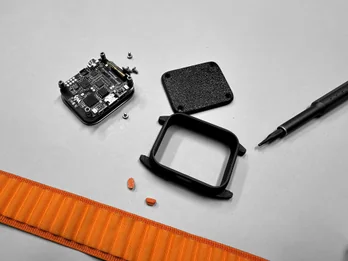
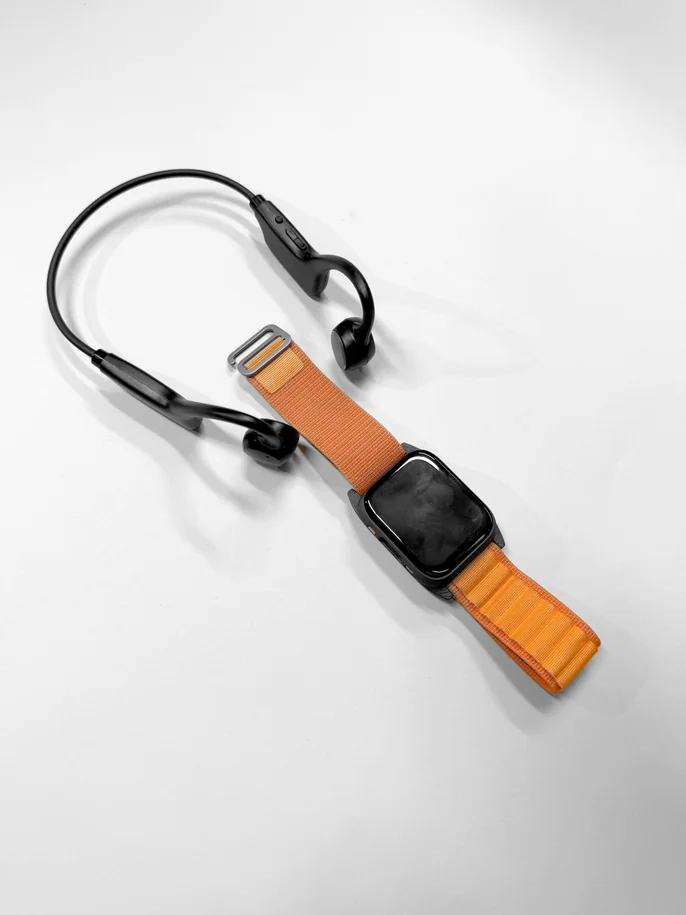
A working watch built around the Waveshare ESP32-S3 1.83″ touch board: a 3D-printed case and back cover modelled around the board, a 300 mAh cell, two printed button caps and a woven loop band — paired with an off-the-shelf bone-conduction headset.
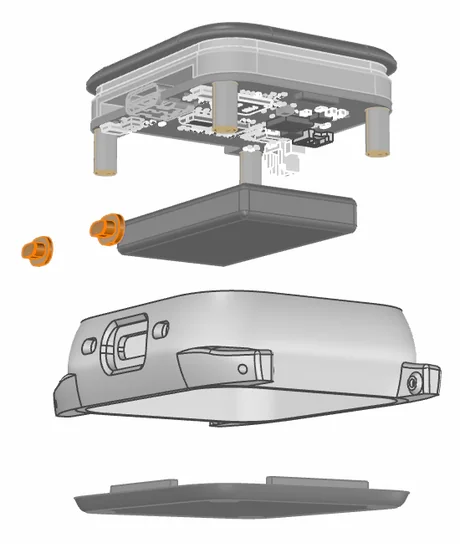
5.1
Exploded view
six parts, two of them printed
1
2
3
4
5
6
1Display

1.83″ capacitive touch LCD, part of the board module

2Main board

ESP32-S3 board on four brass standoffs

3Battery

300 mAh Li-Po, 502035, 3.7 V

4Button caps ×2

3D-printed · orange, over PWR / BOOT

5Case

3D-printed · textured, lugs built in

6Back cover

3D-printed · held by four screws

5.2
Hardware architecture
redrawn from the board schematic
OFF THE BOARD CLOUD AIPHONE APPBC HEADSET speech → text, intentrelay · notes · DSPbone-conducted sound A2DP ESP32-S3R8 2 × Xtensa LX7 · 240 MHz512 KB SRAM · 8 MB PSRAMWi-Fi 2.4 GHz · Bluetooth 5 LE captions UI · intents · logging BLE 5Wi-Fi (optional) MIC × 2 ES7210 ADC PWR / BOOT KEYS QMI8658 IMU PCF85063 RTC MEMS array4-ch, echo cancellationprinted orange capsraise-to-wakeclock on battery I²S I²C 1.83″ TOUCH LCD ES8311 CODEC AMP + SPEAKER 16 MB FLASH TF CARD 240×284 · ST7789P / CST816Dprompt tonesNS4150B class-Dfirmware · UI assetslocal note buffer SPII²SQSPI · SPI POWER USB-C AXP2101 PMU LI-PO CELL charge + flashcharging, rails, power key300 mAh · 3.7 V 3V3
Final prototype
Watch + bone-conduction headset · Oct 2026
5.3
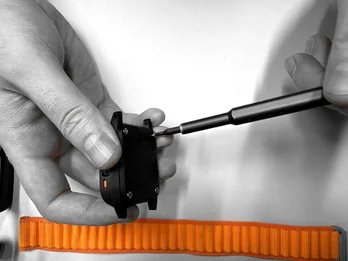
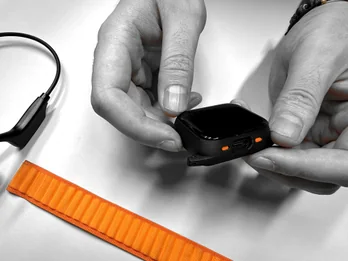
Assembly
eight steps, one screwdriver — the printed parts were modelled around the board, battery and band
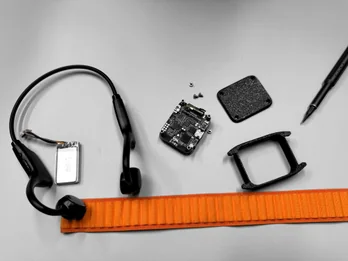
01
Parts. Board, printed case and cover, button caps, band.
02
Kit. With the headset and the 300 mAh cell.
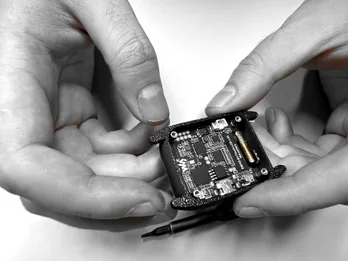
03
Seat the board in the case, display side down.
04
Plug in the cell and lay it over the board.
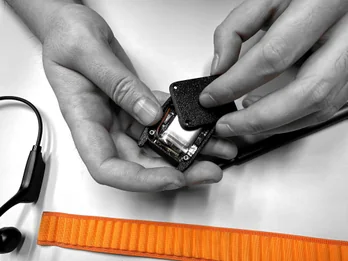
05
Close the back cover over the battery.
06
Four screws through the cover into the case.
07
Check the orange caps and the USB-C opening.
08
Fit the loop through the lugs — ready to wear.
5.4
Specification
Display1.83″ capacitive touch LCD, 240 × 284, 65K colour
ProcessorESP32-S3R8, dual-core 240 MHz, 8 MB PSRAM, 16 MB flash
Audio2 MEMS mics → ES7210 with echo cancellation; ES8311 codec
SensorsQMI8658 6-axis IMU, PCF85063 RTC
RadioWi-Fi 2.4 GHz, Bluetooth 5 LE
Power300 mAh Li-Po (502035), AXP2101 PMU, USB-C
Structure3D-printed case, back cover and button caps; 4 screws
HeadsetOff-the-shelf bone-conduction, Bluetooth
5.5
What we test next
01Captionsword accuracy and delay, quiet vs. noisy rooms
02Look-backtime to recover a missed line
03Tuningword recognition before and after a change
04Comforttwo-hour wear rating, case and headset
05Link + batterydropouts per hour; hours of mixed use
Known limit. The board’s radio is Bluetooth LE only, so headset audio goes through the phone for now — a direct LE Audio link is the next step.